How to convert HEIC to PNG
- Drop your HEIC files into the box above, or click it to choose from your device.
- PNG is already selected for you. Press "Convert to PNG".
- Download each new PNG file, or grab them all at once as a ZIP.
Why convert HEIC to PNG?
HEIC files are best for storing iPhone photos efficiently. PNG is the better choice for screenshots, logos and graphics with sharp edges or transparency. It opens in every browser, phone and image editor, while HEIC opens in apple devices; Windows only with an extra extension.
PNG is lossless, so nothing your HEIC file contains is thrown away on the way.
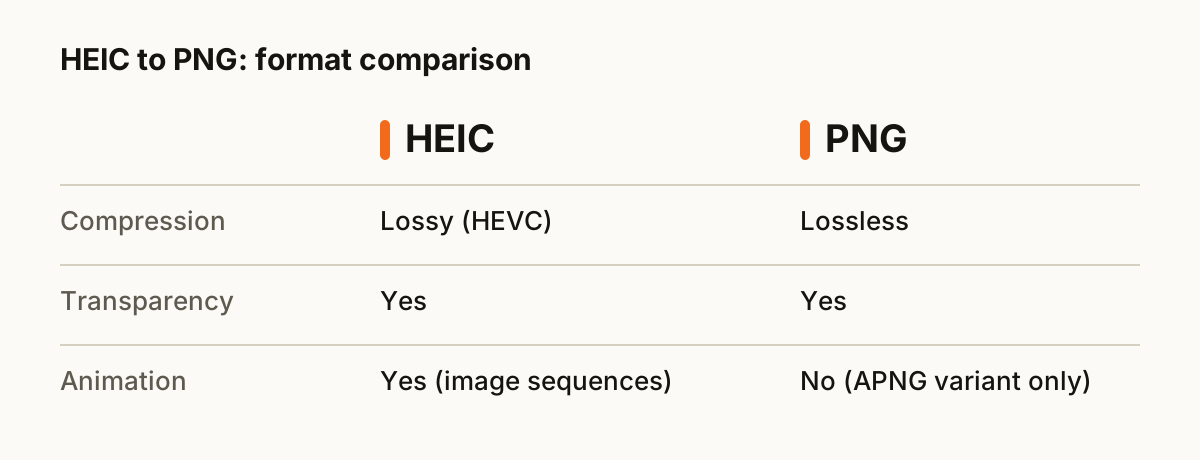
HEIC vs PNG at a glance
| HEIC | PNG | |
|---|---|---|
| Compression | Lossy (HEVC) | Lossless |
| Transparency | Yes | Yes |
| Animation | Yes (image sequences) | No (APNG variant only) |
| Opens in | Apple devices; Windows only with an extra extension | Every browser, phone and image editor |
| Best for | storing iPhone photos efficiently | screenshots, logos and graphics with sharp edges or transparency |
What happens to your file
Most browsers cannot open HEIC on their own, so the page loads a small decoder library that unpacks Apple's HEVC-compressed image data inside your browser. It handles single photos and multi-image HEIC files, and each image comes out as a separate file.
Tips for a clean conversion
- Drop a whole folder's worth of HEIC files at once. They convert one after another and you can download everything as a single ZIP.
- Keep your original HEIC files until you have checked the results. Converting back later is rarely lossless.
- PNG keeps everything it receives, so the result is only ever as good as the HEIC file you start with.
About the formats
HEIC: Apple's default iPhone photo format. Great compression, poor support outside Apple devices.
PNG: Lossless image format with transparency. Best for screenshots, logos and graphics with sharp edges.
Questions
- Is it safe to convert HEIC to PNG here?
- Yes. The conversion runs entirely inside your web browser. Your HEIC file is never uploaded to a server, so nobody else can see it.
- Will I lose quality?
- PNG is lossless, so nothing your HEIC file contains is thrown away on the way.
- Can I convert several HEIC files at once?
- Yes. Drop as many files as you like. Each one is converted in turn, and you can download them one by one or all together as a ZIP.
- Is it free?
- Yes. There is no sign-up, no watermark and no limit on how many files you convert.
- Does it work on a phone?
- Yes. The converter runs in any modern browser, including Safari on iPhone and Chrome on Android, so you can convert HEIC files without installing an app.